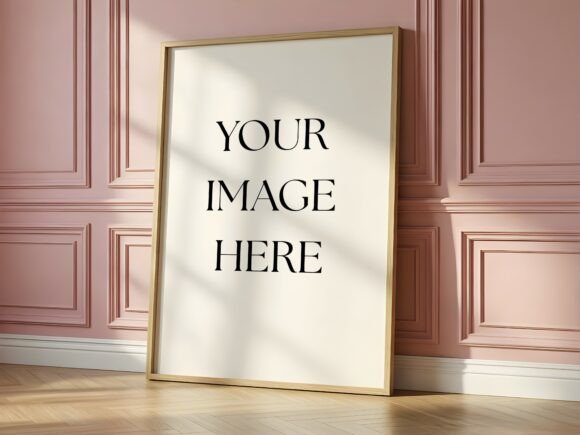
Pink Wall Panel Frame Mockup - Oak: Elevating Your Art Presentation
In the competitive world of digital design, the difference between a sale and a scroll-by often comes down to presentation. The Pink Wall Panel Frame Mockup - Oak offers a sophisticated solution for artists, illustrators, and shop owners who want to showcase their work in a setting that feels both curated and real. This high-resolution scene captures a large vertical oak frame leaning against a dusty pink wall with decorative wainscoting, bathed in soft, natural sunlight. It is designed specifically to create a premium atmosphere, making it an ideal backdrop for floral art, feminine illustrations, or modern gallery prints.
However, simply downloading a mockup does not guarantee professional results. Many creators rush into using these assets without understanding how lighting, aspect ratios, and file handling can make or break the final image. To truly leverage this tool, you need to approach it with a clear strategy that avoids common pitfalls and maximizes the realistic potential of the scene.
Understanding the Value of Context in Mockups
Why choose a specific environment like the Pink Wall Panel Frame Mockup - Oak? In interior design and art sales, context is everything. A flat JPEG of your artwork tells the customer nothing about scale, texture, or how the piece might look in a home. This mockup solves that by placing your design into a believable space. The combination of the warm oak wood and the soft pink tones creates a psychological association with elegance and warmth.
This is particularly effective for niche markets. If you sell botanical prints, wedding invitations, or watercolor portraits, the feminine and classical undertones of the dusty pink wainscoting resonate deeply with your target audience. It signals quality before the viewer even processes the details of your artwork. Ignoring the mood of the background is a missed opportunity; the right setting acts as a silent salesperson, reinforcing the value of your product.
Avoiding the Aspect Ratio Trap
One of the most frequent mistakes designers make when using the Pink Wall Panel Frame Mockup - Oak is ignoring the recommended aspect ratio. The mockup includes two 3 aspect ratio frames tailored for specific dimensions. When users force an image with a different proportion into the Smart Object without adjustment, the result is often a stretched, distorted, or cropped design that looks unprofessional.
Imagine spending hours on a detailed illustration only to have it appear squashed because the width-to-height ratio didn't match the frame. This distortion breaks the illusion of realism and immediately lowers the perceived value of your work. It suggests carelessness, which can deter potential buyers.
To avoid this, always check the dimensions of your artwork before opening the PSD file. If your design does not match the 3 aspect ratio, do not simply drag it in and hope for the best. Instead, use the Free Transform tool (Ctrl + T) inside the Smart Object layer to adjust the canvas size or add padding to your artwork to fit the frame naturally. Alternatively, crop your original image to match the required ratio while ensuring the focal point remains centered. Taking this extra minute ensures your art fits perfectly within the oak frame, maintaining its integrity and visual appeal.
Mastering Lighting and Realism
Another area where beginners often stumble is the manipulation of lighting. The beauty of this mockup lies in the soft, natural sunlight streaming from the window, casting gentle shadows and highlights across the oak frame and the pink wall. However, some users attempt to overpower this existing lighting by applying heavy filters or changing the brightness of their inserted image too drastically.
If your artwork appears brighter than the room it sits in, it will look pasted on rather than integrated. Conversely, if it is too dark, the details will be lost against the shadowed areas of the frame. The goal is harmony. The Pink Wall Panel Frame Mockup - Oak provides adjustable lighting via the Opacity slider, allowing you to fine-tune how much of the frame's texture interacts with your design.
A practical approach is to lower the opacity of the overlay layers slightly to let the grain of the oak and the subtle texture of the wall peek through. This blending technique mimics how light actually behaves in a physical space. Remember, the mockup is compatible with both Photoshop and Photopea, so you don't need expensive software to achieve these adjustments. Use the tools available to blend your art seamlessly, ensuring the transition from the glass of the frame to your image is invisible to the naked eye.
Technical Considerations Before You Buy
Before deciding to purchase or download the Pink Wall Panel Frame Mockup - Oak, it is essential to understand exactly what you are receiving and how it fits into your workflow. This is a digital product, meaning no physical item will be shipped. You will receive one PSD file with Smart Object layers, one high-resolution JPG preview, and a PDF instruction guide.
Beginners sometimes assume they need advanced 3D modeling skills to use such files. This is a misunderstanding. The "drag and drop" functionality of the Smart Object layer makes this accessible to anyone with basic photo editing knowledge. However, you must ensure your software version supports Smart Objects. While compatible with standard Photoshop versions and free alternatives like Photopea, older or stripped-down versions of editing software may struggle with these features.
Additionally, consider the resolution requirements for your platform. If you are using this for a high-end print catalog, the included high-resolution JPG and the ability to export at full size from the PSD are crucial. For social media, you might downscale the final output. Understanding these technical specs beforehand prevents frustration later. Always review the PDF instruction guide included in the package; it contains specific tips on how to fix common issues, such as image distortion or color mismatching, saving you valuable time.
Strategic Application for Maximum Impact
The true power of the Pink Wall Panel Frame Mockup - Oak is realized when used strategically. Do not treat it as a generic template. Think about the story you are telling. If you are a florist selling dried flower arrangements, place your photography within the frame to show how it would look framed on a wall. If you are a graphic designer selling typography posters, use the mockup to demonstrate how the text reads in a domestic setting.
Consistency is key. If you are building a brand identity around classical elegance, using this mockup across your portfolio creates a cohesive narrative. Mixing it with overly industrial or neon-lit mockups can confuse your audience about your brand's aesthetic. Stick to a palette of mockups that complement each other to build trust and recognition.
By avoiding the common errors of aspect ratio stretching, poor lighting integration, and software incompatibility, you ensure that your presentation is as polished as your artwork. The Pink Wall Panel Frame Mockup - Oak is more than just a background; it is a tool for communication. Used correctly, it transforms a simple digital file into a compelling visual experience that invites viewers to imagine your art in their own homes. Take the time to learn the features, respect the proportions, and embrace the atmosphere to achieve the professional results you deserve.