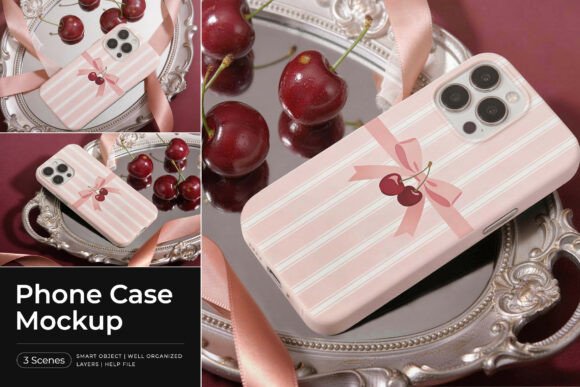
Phone Case Mockup: A Tool for Professional Product Presentation
For designers, marketers, and entrepreneurs in the mobile accessories space, presenting a phone case design in a visually compelling way is essential. A well-crafted phone case mockup allows creators to showcase their artwork, branding, or custom illustrations in a realistic and polished setting. One such option is a stylish and elegant phone case mockup set in a luxurious tabletop scene, featuring soft pink tones, reflective surfaces, and decorative elements like ribbons and cherries. This particular mockup delivers a premium and feminine aesthetic ideal for modern case designs.
What Is a Phone Case Mockup?
A phone case mockup is a digital template that enables users to insert their design into a realistic image of a phone case. These mockups are typically created in Adobe Photoshop and come with Smart Object layers that allow for seamless customization. The specific mockup described here includes three high-quality PSD files, each with a resolution of 4500×3000 pixels at 300 DPI—ensuring clarity and print-readiness.
The set includes multiple scenes and angles, making it suitable for highlighting different aspects of a design. It's especially effective for those looking to present their work in a lifestyle or luxury context, thanks to the carefully curated visual elements like soft lighting, reflective surfaces, and decorative accents.
Why Use a Phone Case Mockup?
Visual presentation plays a crucial role in product marketing, especially in competitive markets like phone accessories. A mockup allows creators to present their work without the need for physical prototypes, saving time and resources. It also provides a way to visualize how a design will look in a real-world setting, which is invaluable during the design, review, and sales processes.
- Professional results – High-resolution files and realistic lighting help elevate the perceived quality of a design.
- Customization made easy – Smart Object layers allow for quick updates and iterations.
- Multiple presentation options – With various scenes and angles included, users can show off their designs from different perspectives.
Key Benefits of This Mockup Set
This particular phone case mockup stands out for several reasons. First, it offers a luxurious and feminine aesthetic that may appeal to niche markets or brands targeting a specific demographic. The inclusion of ribbons, cherries, and soft pink tones makes it ideal for designers looking to evoke a sense of elegance and sophistication.
From a technical standpoint, the mockup is well-organized with clean and structured layers, ensuring a smooth workflow for users of all experience levels. The Smart Object feature simplifies the insertion of artwork, allowing designers to see their changes reflected instantly across all relevant views.
When This Mockup Works Best
This mockup set is particularly useful for:
- E-commerce product listings – High-quality visuals can increase buyer confidence and conversion rates.
- Brand presentations – Designers pitching to manufacturers or retailers benefit from a polished, professional look.
- Social media and marketing – The aesthetic appeal aligns well with lifestyle branding and influencer marketing strategies.
If your target audience appreciates a refined, elegant visual style, this mockup could be a strong fit. It's especially effective for those marketing phone cases in fashion, beauty, or boutique niches.
Considerations and Tradeoffs
While this mockup has many strengths, it’s important to consider whether it aligns with your brand identity and target audience. The soft pink tones and decorative elements may not suit brands that lean toward minimalism, masculinity, or industrial design. In such cases, alternative mockups with more neutral or functional aesthetics might be more appropriate.
Additionally, this mockup requires Adobe Photoshop to use the Smart Object feature. While it's a standard tool for many designers, those without access to Photoshop may need to explore alternative methods or tools for mockup customization.
Alternatives Worth Exploring
Depending on your design goals and audience, other types of mockups may be worth considering:
- Minimalist mockups – For clean, modern brands that prioritize simplicity.
- Flat lay or studio-style mockups – Ideal for straightforward product photography-style presentations.
- 3D renderings – Offer more flexibility in angles and lighting but may require advanced design skills.
Exploring different mockup styles can help ensure your final presentation aligns with both your creative vision and business objectives.
How to Use This Mockup Effectively
Using this phone case mockup is straightforward:
- Open the PSD file in Adobe Photoshop.
- Locate the Smart Object layer and double-click to open it.
- Insert your design and save the file.
- Return to the main mockup file to see your design applied in real-time across the scene.
Because the layers are well-organized, users can easily adjust lighting, shadows, or background elements if needed. This flexibility supports a more tailored final result.
Final Thoughts: Is This Mockup Right for You?
A phone case mockup like this one can be a valuable asset for anyone looking to present their phone case designs professionally. Its combination of high resolution, multiple views, and an elegant aesthetic makes it especially effective for niche markets and premium branding efforts.
However, the decision to use this particular mockup should be based on your brand’s visual identity, target audience, and the message you want to convey. If your designs align with a luxurious, feminine style, this mockup will help you showcase them in the best possible light. If not, exploring other mockup options may better serve your needs.
In the end, choosing the right mockup is about more than just technical quality—it’s about ensuring your presentation supports your brand and resonates with your audience.